


 Ban & Monetization Policy
 MyLiveRoom Rewards Program Rules & Eligibility
How to Launch a Netflix Clone App for Your OTT Business
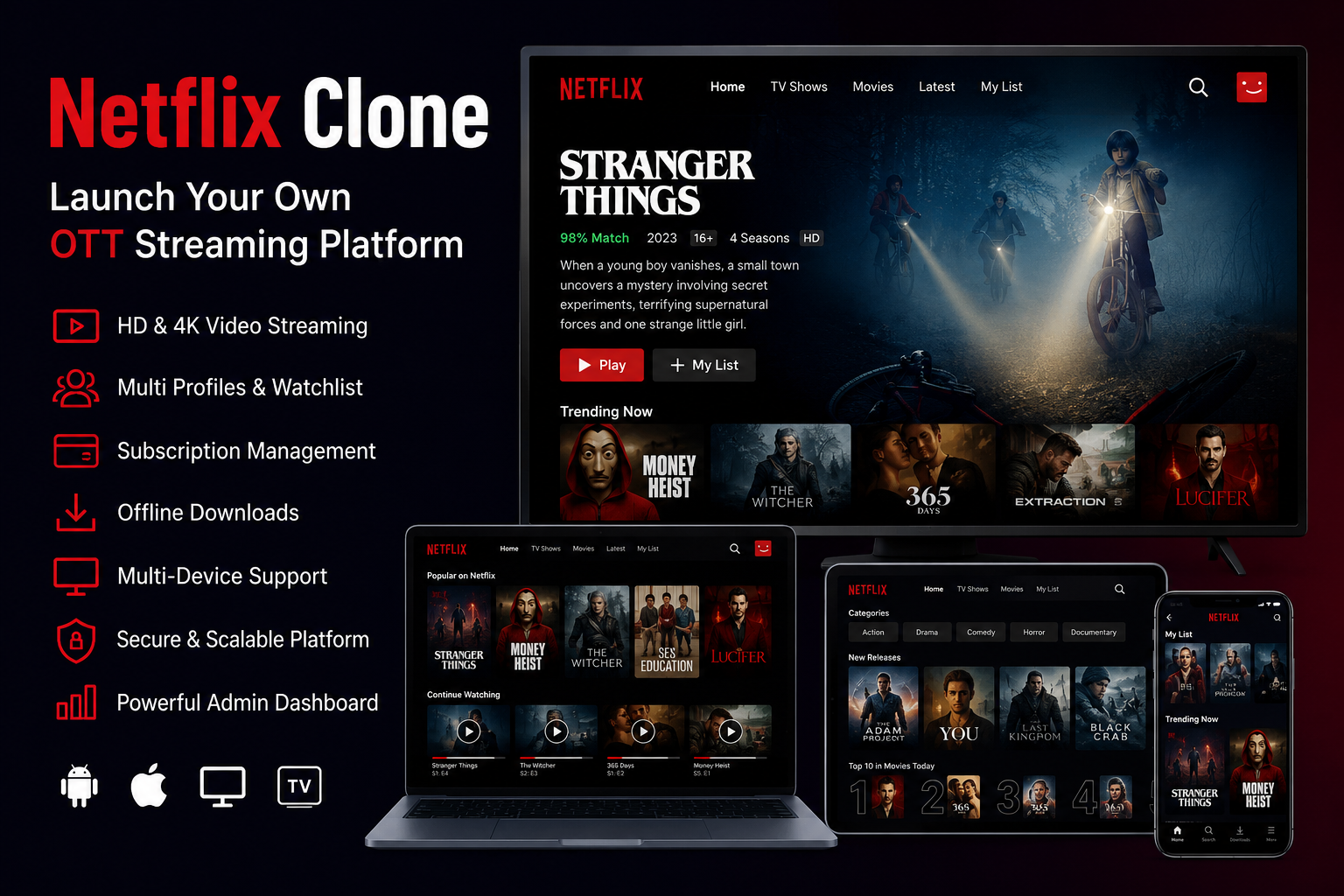
Video streaming has become an important part of digital entertainment, education, sports, fitness, and corporate training. Audiences now expect instant access to movies, series, live programs, courses, and premium videos across mobile phones, websites, and connected devices.
For entrepreneurs and media companies, this creates an opportunity to launch a branded streaming service. A Netflix Clone App provides the technical foundation required to manage content, viewers, subscriptions, payments, producers, and platform operations from one connected system.
However, building a successful OTT business requires more than creating a video player. The platform must offer smooth content discovery, reliable playback, flexible monetization, content security, and complete administrative control.
What Is a Netflix Clone App?
A Netflix Clone App is a customizable OTT and Video-on-Demand platform developed with functionality similar to leading streaming applications.
It allows viewers to register, create profiles, browse content, search by category, add videos to a watchlist, purchase subscriptions, rent premium titles, and continue watching content across supported devices.
Unlike a basic video-sharing website, a complete Netflix-style platform includes multiple business interfaces. These may include:
- Viewer mobile application
- Responsive web streaming platform
- Content producer panel
- Administrative dashboard
- Backend and API infrastructure
The platform owner can customize the branding, content categories, subscription plans, languages, currencies, payment options, and user experience according to the target market.
Why Start an OTT Streaming Platform?
Launching an independent OTT platform allows businesses to build a direct relationship with their audience.
Instead of depending entirely on third-party video platforms, content owners can control how their videos are distributed, priced, promoted, and monetized. They can also access viewer data, subscription activity, content performance, and revenue reports.
A Netflix-style platform can be used by:
- Film studios and broadcasters
- Regional entertainment companies
- Sports and live-event organizers
- Educational institutions
- Fitness and wellness brands
- Religious organizations
- Independent creators
- Corporate training providers
- Kids’ content businesses
The business does not need to compete directly with global streaming companies. It can focus on a specific language, region, industry, audience, or content category.
Essential Features of a Netflix Clone App
User Registration and Secure Login
Users should be able to create accounts through email, mobile numbers, social login, or other configured authentication methods.
Password recovery, OTP verification, session management, and account settings help create a reliable onboarding experience.
Multiple Viewer Profiles
Multiple profiles allow different members of one household to maintain separate viewing histories, recommendations, preferences, and watchlists.
A kids’ profile can include maturity filters and restricted content access. This makes the platform suitable for family audiences.
Advanced Content Search
A growing content library becomes difficult to navigate without an effective search system.
Users should be able to search for movies, series, episodes, live channels, actors, genres, languages, and keywords. Filters can help viewers narrow results based on release year, category, popularity, or content type.
Watchlist and Continue Watching
A watchlist allows viewers to save content for later. The Continue Watching feature helps users resume a movie or episode from the point where they stopped.
These features reduce friction and encourage users to return to the platform.
Movies, Series and Episodes
The platform should support different content formats rather than limiting the library to standalone videos.
Administrators can organize series into seasons and episodes while managing thumbnails, trailers, descriptions, cast details, genres, subtitles, and age ratings.
Live TV and Event Streaming
Live streaming can help the platform deliver television channels, sports matches, concerts, webinars, religious events, conferences, and training sessions.
Operators may provide live content as part of a subscription or sell access separately through pay-per-view.
Subscription Management
Recurring subscription plans remain one of the most common OTT revenue models.
Administrators should be able to create multiple plans based on duration, content access, supported devices, streaming quality, downloads, and profile limits.
Users can compare plans, complete payments, view invoices, and manage their subscriptions from their accounts.
Rentals and Pay-Per-View
Not every viewer wants a recurring subscription.
Rental and pay-per-view features allow users to unlock individual movies, events, courses, or premium videos for a limited period. The platform can define rental prices, expiry periods, access conditions, and payment rules.
Multilingual Content
Regional OTT platforms often serve audiences who consume content in multiple languages.
The application can support translated interfaces, multilingual metadata, subtitles, captions, and language-based content categories. This helps operators expand into new regions without creating a separate platform.
How a Netflix Clone App Works
The viewer begins by creating an account and selecting a subscription plan or free-access option.
After logging in, the user can browse featured banners, trending titles, genres, languages, and personalized content sections. The viewer selects a movie, series, live channel, or premium video and checks the available access conditions.
If the content is included in the user’s plan, playback begins immediately. Premium content may require a rental payment or pay-per-view purchase.
The platform records watch progress, viewing history, transactions, and content interactions. This data helps generate recommendations and gives administrators insights into viewer behaviour.
Behind the viewer experience, administrators manage the content catalogue, subscriptions, banners, producers, payments, coupons, reports, and platform settings.
Producer Panel and Content Management
An OTT business may work with film studios, instructors, creators, broadcasters, or independent content owners.
A dedicated producer panel allows approved partners to submit content proposals, upload media information, manage their catalogue, review performance, and request payouts.
Administrators can review submissions before publication. They can approve, reject, edit, schedule, or remove content according to platform policies.
The referenced solution also supports revenue-sharing workflows based on factors such as minutes viewed and content performance, helping operators build partnerships without purchasing every title upfront.
Revenue Models for a Netflix Clone Business
A flexible OTT platform can combine multiple income sources.
Subscription Revenue
Users pay a recurring monthly, quarterly, or annual fee to access selected content.
Different plans can be created according to streaming quality, device limits, content access, or user profiles.
Rental Revenue
Users pay a one-time fee to access a movie, series, course, or event for a defined rental period.
Pay-Per-View Revenue
Pay-per-view is suitable for sports events, concerts, webinars, new releases, and exclusive programs.
Advertising Revenue
Free or lower-priced plans can display advertisements before, during, or after videos.
The platform may combine advertising with subscriptions to create a hybrid monetization model.
Premium Content Bundles
Operators can sell special packages for regional films, sports, educational courses, children’s programs, documentaries, or creator collections.
Producer Revenue Sharing
Content partners can receive payouts based on configured agreements, watch time, content performance, or platform-defined rules.
Supporting subscriptions, rentals, pay-per-view, live events, premium bundles, and producer earnings reduces dependence on a single revenue source.
The Importance of an Admin Dashboard
The admin dashboard acts as the operational control centre of the streaming business.
Administrators can manage:
- Users and viewer profiles
- Movies, series and episodes
- Live television channels
- Subscription plans
- Rentals and pay-per-view content
- Coupons and promotional offers
- Producer applications
- Revenue-sharing rules
- Payments and payout requests
- Homepage banners
- Categories and languages
- Reports and analytics
- Roles and permissions
Centralized control helps the business maintain content quality, resolve user issues, monitor transactions, and make informed decisions.
Security and Content Protection
OTT platforms handle user information, payments, viewing history, premium content, producer earnings, and licensing details.
Security measures should therefore include secure authentication, protected APIs, role-based access control, encrypted communication, payment-gateway security, producer approval workflows, and administrative activity monitoring.
Content protection is also important. Depending on the business model, the platform may require signed video links, restricted session access, watermarking, screen-recording controls, or DRM integration.
Privacy, access control, payment security, and content governance should be planned before the public launch rather than added after a security problem occurs.
Why Choose a Readymade Netflix Clone Solution?
Developing an OTT platform from the beginning requires video infrastructure, mobile apps, web development, payment integration, content management, subscription logic, APIs, analytics, producer workflows, and extensive testing.
A readymade solution provides these core modules as an existing product foundation.
Founders can then focus on branding, content partnerships, licensing, marketing, pricing, audience acquisition, and regional customization.
Miracuves offers a white-label Netflix Clone foundation with viewer applications, a web platform, admin controls, producer workflows, monetization features, source-code ownership, rebranding, deployment, and app-publishing support. A standard ready-made rollout can be prepared for launch in six days, while advanced customization may require additional time.
Steps to Launch Your OTT Platform
Start by identifying the target audience and content category. Decide whether the platform will focus on entertainment, education, fitness, sports, regional cinema, live events, or another niche.
Next, create a content acquisition strategy. Determine whether you will produce original videos, license existing content, onboard independent producers, or use a combination of these methods.
Select the monetization model and define subscription prices, rental rules, advertising options, and producer agreements.
Customize the application with your logo, colours, domain, categories, languages, payment gateways, and regional settings.
Before launching, test registration, payment, playback, subscriptions, rentals, profile management, content uploads, and administrative workflows across supported devices.
Finally, release the platform with a focused content library and expand it according to audience behaviour and performance data.
Conclusion
A Netflix Clone App can help streaming startups, studios, educators, broadcasters, and content-led businesses launch their own branded OTT platform without developing every technical component from zero.
The platform can bring content management, video playback, subscriptions, rentals, pay-per-view, live streaming, producer operations, and administrative control into one connected ecosystem.
Long-term success will depend on more than the software. Operators must secure valuable content, offer reliable streaming, maintain transparent pricing, protect user information, and regularly improve the viewing experience.
With the right technology foundation and a focused content strategy, businesses can build an OTT platform that serves a specific audience and creates sustainable digital revenue.
 Deutsch
 English
 Arabic
 French
 Spanish
 Portuguese
 Turkish
 Dutch
Dutch
 Italiano
 Russian
 Romaian
 Portuguese (Brazil)
 Greek
Greek
