Selecting the right label printer is critical for streamlining business operations—whether you need to label products, inventory, cables, or shipping packages. The wrong choice can lead to inefficiencies, frequent maintenance issues, and wasted costs. This guide breaks down key factors to help you pick a printer that aligns with your business needs, using insights from industry-trusted solutions like
MakeID.The first step is to clarify what you’ll label and where the printer will be used—this dictates core requirements. Common business scenarios include:
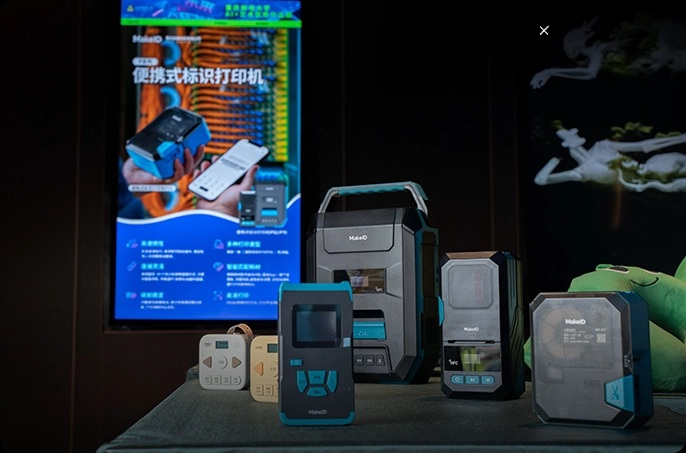
- Industrial labeling: For harsh environments (e.g., telecom towers, power substations) where printers need to withstand dust, moisture, or temperature fluctuations. Choose durable, portable models like MakeID’s GP70, designed for on-site use in fields like electric power or telecommunications.
- Office/retail labeling: For product pricing, inventory tags, or shipping labels in indoor, controlled spaces. Compact, easy-to-operate printers (such as MakeID’s W110) work well here, as they take up minimal desk space and require little maintenance.
- Specialized sectors: Healthcare (for medical device labels) or logistics (for barcode-enabled shipping tags) may need printers that support waterproof, smudge-proof consumables—MakeID’s GP53, for example, pairs with industry-grade labels ideal for these use cases.
Not all label printers are built the same—focus on these specs to match performance to your needs:
- Direct thermal: Uses heat to print on heat-sensitive labels, no ink needed. Best for short-term labels (e.g., shipping tags) and low-volume use. MakeID’s GP52 uses this tech, perfect for small businesses or retail shops.
- Thermal transfer: Uses a heated ribbon to print on durable labels, suitable for long-term use (e.g., industrial cable labels, product IDs). Opt for this if labels need to resist fading, water, or abrasion—MakeID’s GP70 supports thermal transfer for high-demand sectors like electric power.
- Portable printers: Essential for on-site work (e.g., telecom technicians labeling cables at towers, warehouse staff tagging inventory on the floor). Look for lightweight, battery-powered options like MakeID’s W110, which is easy to carry and works offline.
- Desktop printers: Better for fixed locations (e.g., office shipping stations, retail backrooms) where high-volume printing is needed. They offer faster print speeds but lack mobility.
Ensure the printer works with your required label types (e.g., waterproof, QR code-enabled, or specific sizes). MakeID’s printers are designed to pair with matching consumables—for example, the GP53 works exclusively with its dedicated labels, avoiding jams or poor print quality from mismatched supplies.
Your printer should grow with your business—avoid models that limit future needs:
- Print speed and volume: If you anticipate increasing label demand (e.g., a growing e-commerce business), choose a printer with a speed of 4–6 inches per second (like MakeID’s GP70) to handle higher volumes without delays.
- Software integration: Look for printers that connect to your existing systems (e.g., inventory management software, barcode scanners). This lets you automate label design and printing, reducing manual errors.
- Maintenance and support: Opt for brands with reliable after-sales service—MakeID, trusted by giants like China Mobile and State Grid, offers timely support for industrial printers, minimizing downtime for critical operations.
Finally, prioritize printers used by businesses in your sector. MakeID’s lineup, for example, is widely adopted in telecom, electric power, and healthcare because it’s tailored to these industries’ needs:
- Industrial durability for harsh environments.
- Portable designs for on-site flexibility.
- Consumable compatibility for consistent results.
By aligning your choice with industry standards, you reduce the risk of investing in a printer that fails to meet your business’s unique demands.
Choosing a label printer isn’t just about picking a device—it’s about optimizing your workflow. By defining your use case, evaluating key specs, planning for scalability, and trusting industry-proven brands like MakeID, you can select a printer that boosts efficiency, cuts costs, and supports long-term business growth. Whether you need a portable model for fieldwork or a desktop printer for office use, focusing on these factors ensures you make the right decision.



 Ban & Monetization Policy
 MyLiveRoom Rewards Program Rules & Eligibility
 Portuguese
 English
 Arabic
 French
 Spanish
 Deutsch
 Turkish
 Dutch
Dutch
 Italiano
 Russian
 Romaian
 Portuguese (Brazil)
 Greek
Greek
