


 Ban & Monetization Policy
 MyLiveRoom Rewards Program Rules & Eligibility
The Role of Zoom Lens in Adjusting Throw Ratio
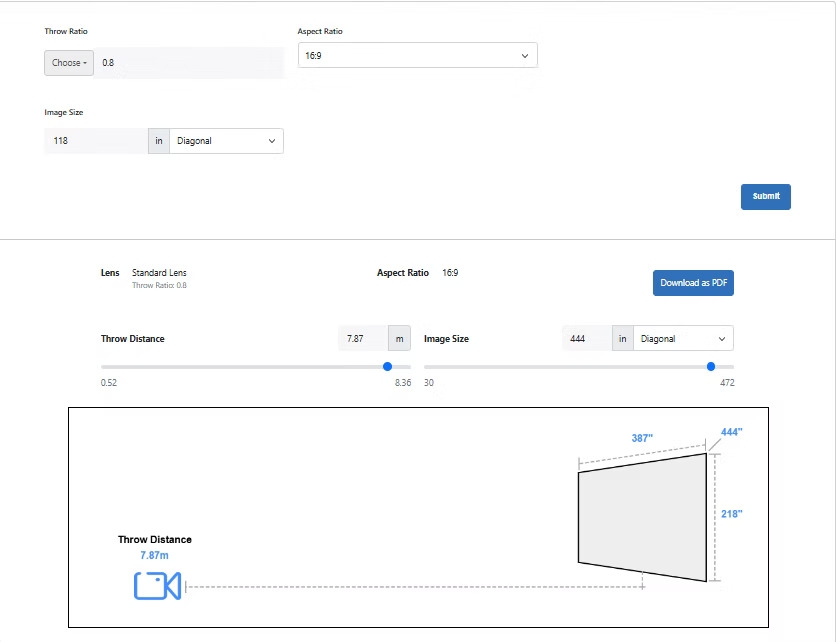
When setting up a home theater or professional AV system, understanding projector specifications is crucial for achieving the ideal image size and placement. One often overlooked but highly impactful feature is the zoom lens. A zoom lens allows you to adjust the projected image size without physically moving the projector, effectively modifying the Throw Ratio. XTEN-AV, a leader in AV system design, provides tools to visualize projector placement, lens adjustment, and screen size, ensuring a Perfect Projector Layout. In this blog, we will explore the role of the zoom lens in adjusting throw ratio and how it can simplify your home theater or professional AV installation.
1. Understanding Throw Ratio
Before discussing zoom lenses, it is important to understand what throw ratio means. Throw ratio is the relationship between the distance from the projector to the screen and the width of the projected image. It is calculated by dividing the projector distance by the image width.
-
A lower throw ratio allows a large image from a short distance, typical in short throw projectors.
-
A higher throw ratio requires a greater distance to achieve the same image size, common in long throw projectors.
Throw ratio plays a crucial role in projector placement, room planning, and overall viewing experience.
2. What a Zoom Lens Does
A zoom lens on a projector allows you to vary the projected image size without moving the device. This means you can:
-
Enlarge the image when the projector is closer to the screen.
-
Reduce the image size when the projector is farther from the screen.
-
Fine-tune alignment and fit the image precisely within the screen boundaries.
By adjusting the lens, you are effectively changing the throw ratio within the projector’s optical limits. This flexibility can save time, prevent installation errors, and optimize image quality.
3. Benefits of a Zoom Lens for Throw Ratio Adjustment
Using a zoom lens to adjust throw ratio provides several advantages:
a. Flexible Placement
A zoom lens allows you to place the projector in different positions within the room while still achieving the desired image size. This is particularly useful in spaces with limited depth or irregular layouts.
b. Easy Screen Size Adjustments
Instead of moving the projector or changing mounts, you can adjust the lens to fit screens of various sizes. This is ideal for multipurpose rooms or venues where screen size may vary.
c. Reduced Keystone Distortion
By adjusting the image size with the zoom lens, you can minimize the need for digital keystone correction, which can degrade image quality. This ensures a cleaner and sharper projection.
d. Optimal Image Quality
Zoom lenses allow the image to remain at the ideal resolution and focus, maintaining high picture clarity across different screen sizes.
XTEN-AV tools can simulate zoom adjustments and show how changing the lens affects throw ratio and image placement, helping you plan a Perfect Projector Layout before installation.
4. Types of Zoom Lenses
Projectors come with different types of zoom lenses:
-
Manual Zoom Lens: Requires physical adjustment by turning a ring or dial on the projector. Suitable for static installations.
-
Motorized Zoom Lens: Can be adjusted remotely or via software, allowing precise control without touching the projector. Ideal for professional AV setups.
-
Powered Lens Shift with Zoom: Combines vertical and horizontal lens shift with zoom functionality, offering maximum flexibility in placement.
Choosing the right lens type depends on your room size, projector placement, and how often you plan to adjust the image size.
5. Calculating Throw Ratio with a Zoom Lens
When using a zoom lens, the throw ratio can be effectively modified within the projector’s range. For example:
-
A projector with a throw ratio of 1.5 to 2.0 means the projector can produce a large image at a shorter distance when zoomed in, or a smaller image at a longer distance when zoomed out.
-
Adjusting the zoom allows you to fit the projected image perfectly on the screen without moving the device.
XTEN-AV offers tools that simulate these variations in throw ratio and image size. This allows precise planning and visualization for different room configurations and projector types.
6. Practical Applications
A zoom lens is especially valuable in the following scenarios:
a. Small Rooms
In bedrooms or apartments, a zoom lens allows you to place a projector closer to the screen while still achieving a large image without sacrificing clarity.
b. Multi-Purpose Spaces
Rooms used for presentations, gaming, and movies may have screens of different sizes. A zoom lens provides flexibility without moving the projector each time.
c. Professional Installations
In conference rooms, auditoriums, or large venues, motorized zoom lenses allow quick adjustments for different events, screen sizes, or seating arrangements.
By simulating these scenarios using XTEN-AV, you can optimize throw ratio, image placement, and overall setup efficiency.
7. Tips for Using Zoom Lenses Effectively
To maximize the benefits of a zoom lens:
-
Measure Your Room and Screen: Know the projector distance and screen width to determine the zoom range needed.
-
Adjust Focus After Zooming: Ensure the image remains sharp at all zoom levels.
-
Check for Edge Clarity: Some projectors may have minor distortion at extreme zoom settings, so adjust carefully.
-
Use AV Planning Tools: Simulate zoom adjustments in XTEN-AV to preview how the image will fit within your space.
-
Combine with Lens Shift: Vertical and horizontal lens shift can further refine placement and reduce distortion.
Proper use of the zoom lens ensures a balanced, immersive viewing experience without compromising throw ratio or image quality.
Conclusion
The zoom lens is a powerful feature that directly affects throw ratio and projector flexibility. By allowing image size adjustments without moving the projector, it simplifies installation, reduces keystone distortion, and enhances overall image quality. XTEN-AV tools enable virtual planning of throw ratio, zoom range, and screen placement, helping you achieve a Perfect Projector Layout in any room size.
Understanding how to use a zoom lens effectively ensures that your projector performs optimally, whether in a compact apartment, a dedicated home theater, or a professional AV installation. By integrating throw ratio considerations, lens adjustments, and proper room planning, you can create a seamless and immersive viewing experience that maximizes both space and performance.
Read more: https://linkspreed.web4.one/read-blog/198093
 Dutch
Dutch
 English
 Arabic
 French
 Spanish
 Portuguese
 Deutsch
 Turkish
 Italiano
 Russian
 Romaian
 Portuguese (Brazil)
 Greek
Greek
