


 Ban & Monetization Policy
 MyLiveRoom Rewards Program Rules & Eligibility
How to Set Flight Price Alerts That Actually Work (Step-by-Step)
You find a flight. The price looks reasonable. You think about it for a day. You come back — and it has jumped by three thousand rupees.
Sound familiar?
Flight prices do not sit still. They shift multiple times a day based on demand, seat availability, competitor pricing, and algorithms that are constantly recalibrating. For most travellers, this feels unpredictable and unfair. But there is a way to stop chasing prices and start getting notified when the price comes to you — and that is through flight price alerts.
When set up correctly, price alerts do the waiting for you. You stop refreshing flight search pages obsessively and start getting notified the moment a fare drops to a level you are comfortable with. This guide walks you through exactly how to do that — step by step — using the tools that actually deliver results.
What Is a Flight Price Alert and How Does It Work?
A flight price alert is a notification — sent by email, app, or SMS — that tells you when the price of a specific flight route changes. You set the route, sometimes a target price, and the platform monitors fares on your behalf. When the price drops (or, in some cases, rises), you get a notification.
Most price alert systems work by continuously pulling fare data from airline databases, global distribution systems (GDS), and booking platforms. Because flight prices update constantly — sometimes hundreds of times a day on busy routes — the alert system needs to be actively monitoring in real time or at regular intervals throughout the day to be useful.
The difference between a price alert that works and one that does not comes down to three things: the platform you use, how you configure the alert, and how quickly you act when the notification arrives.
Why Flight Prices Change So Frequently
Before setting up alerts, it helps to understand why prices move in the first place — because this knowledge will inform when and how you set your alerts.
Airlines use a pricing method called dynamic pricing, sometimes called revenue management. Every flight has a set number of seats, and each seat may be priced differently depending on when it is purchased, how many seats remain, and what competitors are charging on the same route.
As a general pattern, fares tend to follow a curve. Prices start moderately high when flights first go on sale — sometimes six to twelve months out. They often dip during a mid-range booking window — typically six to eight weeks before departure for domestic flights, and two to four months out for international routes. Then, as the departure date approaches and seats fill up, prices tend to rise again sharply.
There are exceptions. Last-minute deals do exist, particularly on routes where demand has not met expectations. Flash sales, airline promotions, and error fares — where a technical mistake results in a briefly available very low price — can also produce significant savings. Price alerts are the most reliable way to catch all of these.
Step 1 — Choose the Right Platform for Price Alerts
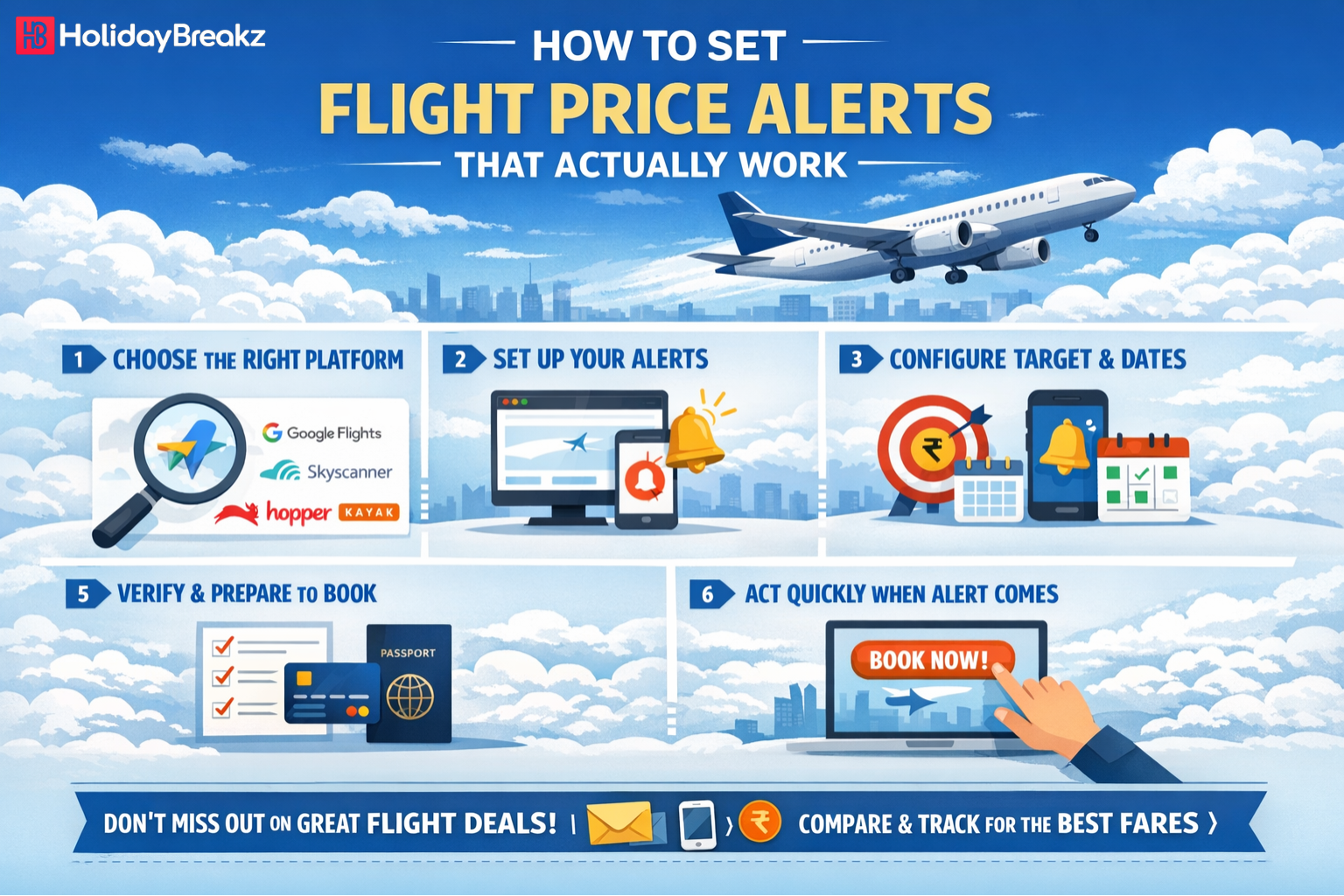
Not all price alert tools are equal. Some monitor a limited number of airlines. Others send alerts too infrequently to be useful. Some are excellent for broad route monitoring while others work better for specific flight searches. Here are the most reliable options:
Google Flights Google Flights is one of the most widely used tools for price tracking. Once you search for a route, you can toggle on price tracking for that specific search — including date flexibility if you want alerts across multiple departure dates. Alerts are sent by email and are generally timely. Google Flights pulls data from a wide range of airlines and is particularly strong for international routes.
Skyscanner Skyscanner offers price alerts on specific routes or on "whole month" searches, which is useful if your travel dates are flexible. Their alert system covers a large number of carriers including many regional and low-cost airlines that do not always appear on Google Flights. You can set alerts without needing an account, though a registered account gives you better management of multiple alerts.
Kayak Kayak's price alert feature allows you to track specific routes and receive email notifications when fares change. Kayak also shows a "price forecast" indicator — a prediction of whether the current fare is likely to go up or down — which can help you decide whether to book now or wait.
Hopper Hopper is a mobile-first app that analyses historical pricing data to predict whether a fare will rise or fall, and by approximately how much. It sends push notifications when prices drop and gives a recommendation on whether to book now or wait. It is particularly strong for travellers who are flexible on exact dates and want data-driven guidance on timing.
Airline Websites and Apps Many airlines offer their own fare alert features. These are worth using alongside third-party tools because airlines sometimes offer exclusive fares, flash sales, and loyalty member prices that do not appear on aggregator platforms. Subscribing to an airline's email list or enabling app notifications can occasionally surface deals that no third-party tracker catches.
HolidayBreakz India For travellers in India booking flights on domestic and international routes, HolidayBreakz India is a useful starting point for comparing fares and understanding the full cost of your journey — including fare conditions, baggage policies, and optional services. Checking your target route regularly on a dedicated booking platform alongside your automated alerts ensures you have both real-time deal notifications and a clear view of what each fare actually includes.
Step 2 — Set Up a Google Flights Price Alert (Detailed Walkthrough)
Google Flights is the easiest starting point for most travellers. Here is exactly how to set it up:
On Desktop:
- Go to google.com/flights
- Enter your origin and destination cities
- Select your travel dates — or use the "flexible dates" option to monitor a range
- Click Search
- On the results page, look for the toggle that says "Track prices" — it appears near the top of the results, usually alongside a bell icon
- Switch it on
- If you are signed into your Google account, the alert is saved automatically. If not, you will be prompted to enter your email address
- Google will now send you email notifications when the price changes for that route and date combination
On Mobile (Google Flights app or mobile browser):
- Search for your route as normal
- Tap the bell icon or "Track prices" button that appears in the results
- Sign in or enter your email to confirm
Tips for Google Flights alerts:
- Use the "Date grid" or "Price graph" view to identify the cheapest travel dates within a window before setting your alert — this ensures you are tracking the most promising dates
- Enable alerts for both the outbound and return journey separately if you are booking a round trip with split legs
- Check that notification emails are not going into your spam or promotions folder — move one to your primary inbox to train your email client
Step 3 — Set Up a Skyscanner Price Alert
- Go to skyscanner.net and enter your route and dates
- On the results page, scroll to find the "Get price alerts" option — it typically appears as a button or banner near the top of listings
- Enter your email address and confirm
- For flexible searches, use "Whole month" in the date picker to get alerts across an entire calendar month — useful if you have not fixed your travel dates yet
- You can also set an alert for a "Whole year" search if you are planning far in advance and want to catch the lowest possible fare over time
Skyscanner will email you when the price changes. The alerts include a comparison to the previous tracked price, so you can immediately see whether the fare has moved significantly or just shifted marginally.
Step 4 — Set Up Alerts on Hopper (Mobile)
- Download the Hopper app (available on iOS and Android)
- Search for your route and dates
- Hopper immediately shows a fare prediction — a colour-coded indicator (green for "buy now," yellow for "wait," red for "prices are rising") along with an estimated price range for the coming weeks
- Tap "Watch this trip" to add it to your watchlist
- Enable push notifications for the app so you receive real-time alerts when the fare reaches Hopper's recommended price point
Hopper's strength is its predictive model. Rather than just notifying you of any price change, it tells you whether the current price is likely the best you will get or whether waiting could yield a better deal. This is particularly useful for travellers who are unsure whether to book immediately or hold on.
Step 5 — Configure Your Alerts the Right Way
Setting up an alert is only half the job. How you configure it determines whether you get useful notifications or an overwhelming flood of minor price movements. Here is how to set alerts that deliver genuine value:
Be specific about your route Vague searches — like "flights from Delhi to anywhere in Europe" — generate too many alerts to be actionable. Start with a specific origin and destination. If you are flexible on destination, run separate alerts for your top two or three options.
Set a realistic target price Some platforms allow you to specify a price threshold — you only get notified when the fare drops below a certain amount. Use historical data (available on Google Flights' price graph and on Hopper) to set a target that is genuinely achievable rather than wishful. A target that is too low will never trigger. A target that is too high will generate alerts for prices that are not actually good deals.
Track a date range, not just one date If your schedule allows any flexibility at all — even shifting by a day or two — set alerts across a range of dates. The difference in fare between a Tuesday departure and a Friday departure on the same route can be significant, and monitoring a range multiplies your chances of catching a good price.
Set multiple alerts across platforms No single platform has access to every fare. Setting alerts on both Google Flights and Skyscanner (and Hopper if you are mobile-first) ensures you have broader coverage. The incremental effort is minimal — a few extra minutes — and it meaningfully increases the chances of catching the best available price.
Check that alerts are actually arriving After setting up an alert, wait 24 to 48 hours and check that you have received at least one notification. If nothing arrives, check your spam folder, confirm your email address is correct, and make sure the alert was saved properly. A silent alert is no alert at all.
Step 6 — Know When to Act on a Price Alert
Receiving a price alert is not the same as securing a deal. Flight prices can rise again within hours — sometimes within minutes on high-demand routes. Here is how to act quickly and confidently when an alert arrives:
Have your booking details ready in advance Before an alert arrives, make sure your passport details, payment information, and travel preferences are saved somewhere accessible. When a deal appears, the last thing you want is to spend ten minutes hunting for your card number while the price climbs back up.
Verify the fare before booking When an alert arrives, go directly to the booking platform and confirm the price is still showing before completing payment. Fares displayed in alert emails may reflect prices from when the notification was generated, not the current live price.
Check the total price, not just the base fare A low base fare that requires expensive paid baggage, mandatory seat selection fees, or an inconvenient connection may not be a genuine saving. Before clicking pay, add up the total cost including all the services you actually need.
Book directly with the airline if the fare is identical If the price on a third-party platform matches what is available on the airline's own website, booking direct can offer advantages — easier changes, direct customer service, and loyalty points if you are part of a frequent flyer programme.
Do not wait for a better deal if the current price is genuinely good Analysis paralysis is real when it comes to flight booking. If an alert shows a fare that is noticeably below what you have been seeing — particularly if historical data suggests it is near the low end — booking promptly is usually the right call. There is rarely a guarantee that the price will drop further.
Common Mistakes That Make Price Alerts Less Effective
Even travellers who use price alerts regularly sometimes make errors that reduce their effectiveness. These are the most common ones to avoid:
Setting alerts too late. For international flights, setting an alert two weeks before your intended travel date is often too late to catch meaningful savings. The best prices on popular international routes are typically available six weeks to four months out. Set alerts early — even if you are not yet certain you will travel.
Only tracking one platform. Relying on a single alert tool means you are only seeing a portion of available fares. Domestic Indian carriers, regional airlines, and charter operators do not always appear on every aggregator. Cross-platform monitoring closes this gap.
Ignoring the day and time of booking. Research consistently suggests that certain days and times of the week produce slightly better fares — midweek searches and off-peak browsing hours tend to surface marginally lower prices on some routes. While the difference is not always dramatic, it is worth being aware of.
Not checking what the alert price actually includes. A headline fare of ₹3,499 that turns into ₹7,200 after baggage and seat selection is not the deal it first appeared to be. Always calculate the full-cost equivalent before comparing fare alerts.
Failing to act quickly. Promotional fares, error fares, and flash sale prices can expire within hours. If you receive an alert for an unusually low fare, treat it as time-sensitive.
How Far in Advance Should You Set Price Alerts?
This depends on the type of journey:
Domestic flights within India: Set alerts four to eight weeks before your intended departure date. Domestic fares in India tend to be most competitive in this window, with prices rising sharply in the final two weeks before departure.
Short-haul international flights (South Asia, Southeast Asia, Middle East): Six to ten weeks before departure is a good window. Budget carriers on these routes occasionally release promotional fares further out, so setting an alert three to four months in advance for popular leisure routes is worthwhile.
Long-haul international flights (Europe, USA, Australia, UK): Two to four months before departure generally captures the best balance of availability and price. Setting an alert up to six months out for premium cabin fares is advisable, as business and first-class prices tend to move differently from economy.
Peak season travel (festive periods, school holidays, summer): Add an extra four to six weeks to all of the above. During Diwali, Christmas, summer holidays, and other peak periods, prices rise much earlier and much more sharply. Early alerts are essential.
Frequently Asked Questions About Flight Price Alerts
Are flight price alerts free to use?
Yes. Google Flights, Skyscanner, Kayak, and Hopper all offer price alerts at no charge. You do not need a paid subscription to use the basic alert features on any of these platforms.
How often do price alert platforms check for fare changes?
It varies by platform. Google Flights and Skyscanner check fares frequently throughout the day. Hopper updates its predictions regularly and sends push notifications in near real time when significant drops occur.
Can I set a price alert without knowing my exact travel dates?
Yes. Both Google Flights and Skyscanner allow flexible date searches where you can track prices across an entire month or a range of dates. Hopper also allows flexible date monitoring with fare predictions across a window.
Will a price alert guarantee I get the cheapest fare?
No alert system guarantees the absolute lowest price — fare data is vast and no single platform captures every available option. However, using multiple alerts across two or three platforms significantly increases the probability of catching a strong deal.
What should I do if a price alert shows a fare that seems too cheap to be real?
These are sometimes called error fares — genuine pricing mistakes by airlines or systems. They are rare but do occur. If you see a fare that is dramatically below the usual price for a route, act quickly. Airlines are not always obligated to honour error fares, but many do, particularly if tickets are issued before the error is identified. Book it, then monitor your email for a confirmation.
Do airlines ever offer exclusive deals not captured by alert platforms?
Yes. Some promotional fares are only available through an airline's own website, app, or email newsletter. It is worth subscribing to fare newsletters from airlines you fly regularly, as these sometimes include genuinely exclusive deals.
How many price alerts should I set at once?
There is no strict limit, but managing too many alerts can become noisy and counterproductive. Focus on the three to five routes you are most seriously considering and track those thoroughly rather than setting broad, unfocused alerts across dozens of routes.
Final Thoughts
Flight price alerts are one of the most underused tools available to everyday travellers. They require very little effort to set up, cost nothing, and can produce savings that make a meaningful difference — particularly on international bookings where fare differences can run into thousands of rupees.
The key is using the right combination of platforms, configuring your alerts thoughtfully, and acting decisively when a good fare appears. Stop refreshing booking pages manually. Let the alerts come to you.
If you are planning your next trip and want to compare flight options across airlines before setting your alerts — so you know what a genuinely good price looks like for your route — that preparation pays dividends when your first alert lands in your inbox.
Know your benchmark. Set your alerts. Book with confidence.
 Turkish
 English
 Arabic
 French
 Spanish
 Portuguese
 Deutsch
 Dutch
Dutch
 Italiano
 Russian
 Romaian
 Portuguese (Brazil)
 Greek
Greek
