


 Ban & Monetization Policy
 MyLiveRoom Rewards Program Rules & Eligibility
Native vs Cross-Platform Mobile App Development: The Decision That Shapes Everything
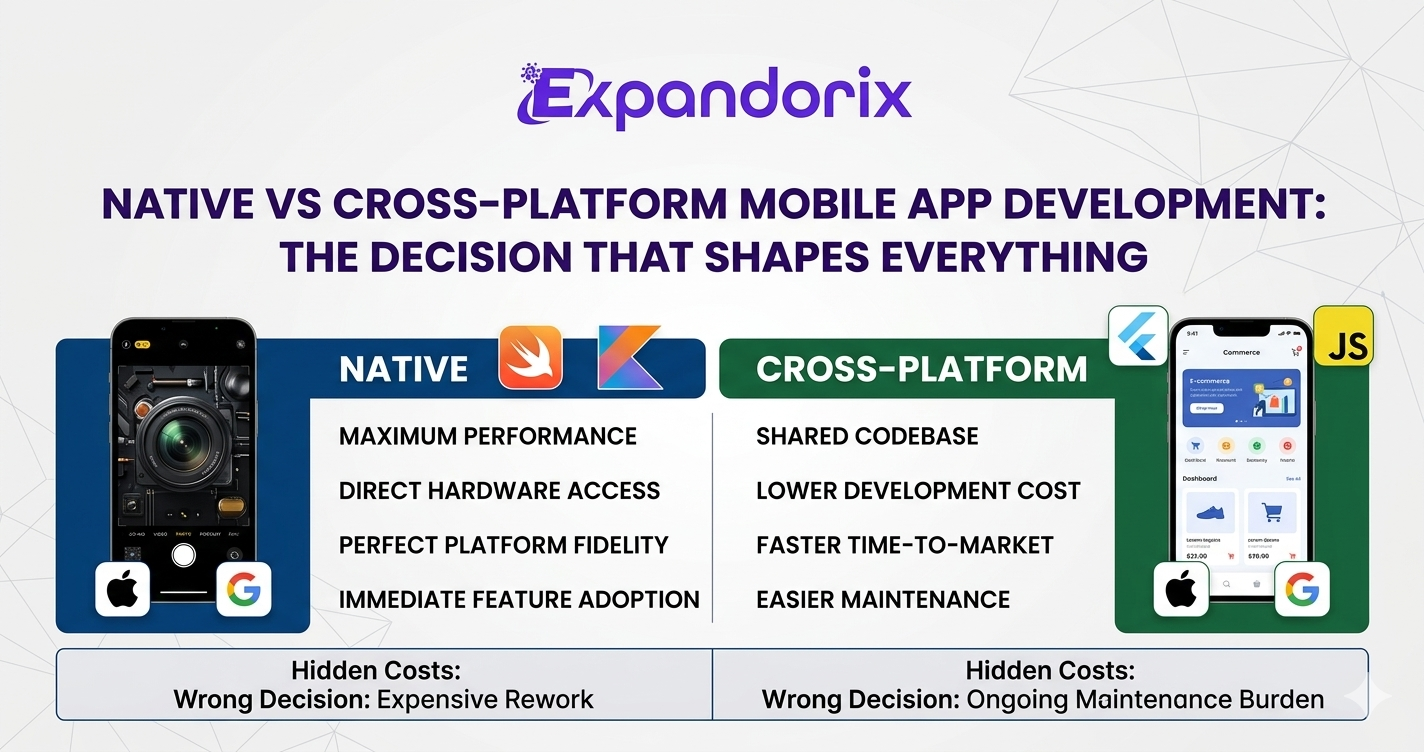
Among all the technical decisions that shape a mobile app project, none has broader implications than the choice between native and cross-platform development. This single architectural decision affects development cost, timeline, performance characteristics, user experience quality, long-term maintenance burden, and the ability to take advantage of new platform capabilities. It is a decision that should be made deliberately, based on a clear-eyed assessment of your specific requirements — not based on a development company's default preferences or the latest industry trend.
This guide provides a comprehensive, nuanced treatment of the native versus cross-platform question. We will cover the technical fundamentals of each approach, the business trade-offs at stake, the specific conditions under which each approach is most appropriate, the current state of the leading cross-platform frameworks, and the questions you should ask any mobile app development agency before accepting their technology recommendation.
Understanding Native Mobile Development
Native mobile development means building separate applications for each target platform using the programming languages and development tools that the platform provider has designed specifically for that environment. For iOS, this means developing in Swift (Apple's modern language, introduced in 2014) or its predecessor Objective-C, using Xcode as the primary development environment and Apple's own UIKit and SwiftUI frameworks for interface construction. For Android, this means developing in Kotlin (Google's preferred modern language) or Java, using Android Studio and Google's Jetpack component library.
The defining characteristic of native development is that the app is compiled directly to machine code that runs on the device's processor, with direct access to the operating system's APIs, hardware components (camera, GPS, accelerometer, biometric sensors), and UI rendering pipeline. There is no intermediary layer between the application code and the platform — the app speaks the platform's native language, literally and figuratively.
Performance Advantages of Native Development
Native apps consistently deliver the highest performance ceiling of any development approach. Because the code is compiled directly to machine code, computationally intensive operations — graphics rendering, video processing, real-time audio analysis, machine learning inference — execute with maximum efficiency. Animations run at 60 or 120 frames per second (depending on device hardware) without the overhead of a JavaScript bridge or a cross-platform rendering layer. Memory management is tightly controlled, reducing the risk of performance degradation over extended usage sessions.
For apps where performance is a primary user experience concern — gaming apps, real-time video communication platforms, augmented reality applications, professional media tools — native development is the only approach that can reliably deliver the required performance characteristics. The performance gap between native and cross-platform, which was significant five years ago, has narrowed considerably for many app categories, but remains material for performance-intensive use cases.
Platform Fidelity and User Experience
Native apps also deliver the highest level of platform fidelity — the degree to which the app behaves in a way that feels natural and familiar to users of a specific platform. iOS users have expectations shaped by years of using Apple's own apps: specific gesture patterns, navigation conventions, UI component behaviours, and interaction physics that are defined by Apple's Human Interface Guidelines. Android users have analogous expectations shaped by Google's Material Design system. Apps that deviate from these platform conventions create cognitive friction that users find subtly (and sometimes explicitly) frustrating.
Native development makes platform-fidelity straightforward because the frameworks provide all the standard platform components — navigation bars, tab bars, action sheets, pickers, alerts — with their native behaviours and styling already implemented. Cross-platform frameworks, by contrast, either render platform-appropriate components (React Native's approach) or render their own component library that approximates native conventions without fully matching them (Flutter's approach). The difference is often subtle, but it is perceptible to attentive users.
Access to Latest Platform Features
Apple and Google release new operating system versions annually, each introducing new APIs, capabilities, and design patterns. Native developers can adopt these new capabilities immediately, on the day they are released. Cross-platform frameworks, by contrast, must update their frameworks to expose new native APIs before their developers can use them — a process that typically takes weeks to months after each OS release. For apps where being first to adopt new platform capabilities is a competitive advantage, native development provides a meaningful edge.
Understanding Cross-Platform Mobile Development
Cross-platform mobile development uses a single shared codebase to build applications that run on both iOS and Android. Rather than writing separate iOS and Android implementations of every feature, developers write code once in a shared language or framework that then compiles, renders, or bridges to each target platform. The appeal is obvious: if most of your application logic, user interface, and business rules are the same on both platforms, why write them twice?
The cross-platform landscape has evolved significantly over the past decade. Early approaches (PhoneGap, Cordova) wrapped web applications in a native shell, producing apps that felt distinctly non-native and suffered significant performance penalties. Modern frameworks have addressed many of these limitations. The two dominant frameworks today — Flutter and React Native — take different architectural approaches and have different performance characteristics, strengths, and trade-offs.
Flutter: Google's Approach to Cross-Platform
Flutter, released by Google in 2018, takes a unique approach to cross-platform development: rather than using native platform UI components or a web rendering engine, Flutter renders its own UI components using the Skia graphics library (and increasingly the Impeller engine for better performance). This means Flutter apps do not use any native UI components — everything is rendered by Flutter's own rendering pipeline, which runs in a Dart programming language runtime.
The advantages of this approach are significant. Because Flutter owns its own rendering pipeline, it can deliver consistent, pixel-perfect UI across both iOS and Android without any platform-specific variations. Animations and transitions are smooth and consistent because they are rendered at the Flutter layer rather than relying on platform animation frameworks. And because Dart compiles to native ARM code, Flutter's performance characteristics are excellent — comparable to native for most app categories.
The trade-off is that Flutter apps do not look natively native — they use Flutter's own component library (Material Design widgets and a growing Cupertino-style iOS component library) rather than genuine platform components. This can result in subtle UX differences that attentive users of each platform will notice, though the gap has narrowed significantly as Flutter's component library has matured.
React Native: Meta's Approach to Cross-Platform
React Native, maintained by Meta (formerly Facebook), takes a different architectural approach. Developers write UI components in JavaScript using React, and the framework bridges these components to the actual native UI components of each platform. An iOS button in React Native is a genuine UIKit button; an Android button is a genuine Android View. This means React Native apps have a higher degree of native fidelity than Flutter apps, at the cost of architectural complexity.
The main challenge with React Native's architecture has historically been the JavaScript bridge — the mechanism by which the JavaScript runtime communicates with native components. This bridge has been a source of performance bottlenecks in complex apps. Meta's ongoing rewrite of React Native's core architecture (the 'New Architecture' using a JavaScript Interface rather than a bridge) addresses many of these limitations and has significantly improved performance in recent versions.
The Business Case for Each Approach
When to Choose Native Development
Native development is most appropriate when performance is a primary product differentiator — games, real-time video, AR/VR, professional media tools; when the app requires deep integration with platform-specific hardware or capabilities not yet exposed by cross-platform frameworks; when the product is iOS-first or Android-first (not truly cross-platform), making the shared codebase benefit irrelevant; when the target user base has extremely high UX expectations that demand pixel-perfect platform fidelity; or when the development team already has deep native expertise and the productivity cost of learning a cross-platform framework would offset the maintenance benefits.
When to Choose Cross-Platform Development
Cross-platform development is most appropriate when the product must be available on both iOS and Android from launch and budget constrains a dual native approach; when the app is a business or enterprise tool where platform fidelity is less important than feature completeness; when time-to-market is a primary competitive concern and a shared codebase accelerates delivery; when the team includes strong React or Dart developers who can be immediately productive in React Native or Flutter respectively; or when the app's features are primarily information display, forms, lists, and navigation rather than graphics-intensive rendering.
For the majority of business apps — e-commerce platforms, service marketplaces, enterprise productivity tools, content apps, social platforms — modern cross-platform frameworks deliver performance and UX quality that is functionally indistinguishable from native. The productivity benefits of a shared codebase in terms of development speed, bug fix consistency, and feature parity are substantial.
The Hidden Cost of the Wrong Decision
Choosing the wrong development approach for your specific context carries real costs that extend well beyond the initial development engagement. A cross-platform app built for a use case that genuinely requires native performance will require expensive architectural rework — potentially rebuilding large portions of the app — when performance problems become apparent at scale. A native app built for a use case that would have been well-served by cross-platform development carries ongoing maintenance overhead (two codebases, two sets of dependencies, two app store release cycles) that compounds over time and consumes development resources that could be invested in new features.
The best mobile app development will help you avoid this trap by conducting a thorough assessment of your requirements before making a technology recommendation. They will ask about your performance requirements, your target user demographics, your timeline and budget constraints, your team's existing skills, and your long-term product roadmap — and they will be transparent about the trade-offs of each approach in your specific context.
Practical Questions to Ask Your Development Partner
When a development partner recommends a specific approach for your project, push for specificity. Ask them to walk you through the decision criteria they applied to your project and explain why the recommended approach is superior to the alternative for your specific use case. Ask for examples of comparable projects where they used the same approach and can demonstrate the performance and UX outcomes. Ask how they have handled cases where a cross-platform app needed native performance optimisation — whether through targeted native modules, platform-specific code paths, or architectural refactoring.
Also ask how their recommendation would change if your requirements changed. If you later needed to add an AR feature, a complex animation system, or deep integration with a new hardware sensor, how would the chosen architecture accommodate that? This question tests whether the team is thinking about your product's long-term trajectory, not just the immediate build.
Conclusion
The native versus cross-platform decision is consequential, contextual, and complex. There is no universally correct answer — only the answer that is right for your specific product, market, team, and timeline. The best outcome from this decision is not the 'right' technology choice in the abstract, but the right technology choice for your specific context, made by a team that has done the analysis honestly and can explain their reasoning clearly. A development partner who approaches this question with nuance and intellectual honesty is demonstrating exactly the kind of judgement you need throughout the entire project.
 Russian
 English
 Arabic
 French
 Spanish
 Portuguese
 Deutsch
 Turkish
 Dutch
Dutch
 Italiano
 Romaian
 Portuguese (Brazil)
 Greek
Greek
